
If you’ve heard the word “schema” and quietly hoped it would go away, this is worth five minutes.
Schema markup is a small block of structured code on your page that labels what things are. This string of numbers is a phone number. This is an opening time. This is the area you cover. This is the service you sell.
For years, the payoff was mostly cosmetic: star ratings and FAQ dropdowns in search results. Most of those extras have since been scaled back, and Google stopped showing FAQ rich results altogether in May 2026. So it’s fair to ask whether schema is still worth the bother.
For a local business, it is. Just for a different reason.
New to schema? Our explainer, What Is Schema Markup and Why Is It Important for Your Website?, still covers the basics and we wrote this some time ago.
Why schema still matters
Search is no longer just a list of links. Google’s AI Overviews and AI Mode, along with tools like ChatGPT, summarise businesses rather than simply listing them. To do that, they have to work out from your website who you are, where you are, what you do and when you’re open.
Schema removes the guesswork. It’s the difference between hoping a machine reads your “About us” paragraph correctly and telling it outright.
A note of honesty: we’d rather be accurate than oversell it. Google says there’s no special schema you need to add to appear in its AI features, and schema isn’t a ranking factor in the traditional sense. Think of it as a comprehension aid. It makes your business easier to understand and harder to misrepresent, and clear, consistent information is exactly what search engines and AI tools rely on.
What to mark up first
LocalBusiness, using the most specific type you can
This is the foundation. At a minimum, Google needs your business name and address. Beyond that, add your phone number, website, opening hours and map coordinates.
Choose the most specific type rather than the generic LocalBusiness. Schema.org has dedicated types for many trades and services, including Plumber, Electrician, RoofingContractor, HVACBusiness, AutoRepair, Dentist and AccountingService. A specific type tells search engines what you are before they’ve read a word.
Action: Look up your trade on schema.org and use the closest match. If nothing fits, LocalBusiness is fine.
Make it match your Google Business Profile exactly
Your schema, your website footer and your Google Business Profile should say the same thing: the same business name, address format, phone number and opening hours.
Inconsistency is one of the most common local SEO problems we find, and it’s entirely self-inflicted. If Google sees “Ltd” in one place and not another, two different phone numbers, or hours that don’t match, it has to guess which version is right.
Action: Open your Business Profile and your website side by side. Fix any differences before you add a line of code.
Say where you work, not just where you’re based
If you travel to customers, as trades, cleaners and mobile services do, your address only tells half the story. The areaServed property lets you list the towns or areas you cover.
If you work from home and hide your address on Google, keep your schema consistent with what your Business Profile shows publicly.
Action: Add areaServed with the towns you actually want work in, not every town in the county.
Connect your profiles with sameAs
The sameAs property points to your other official profiles: Facebook, LinkedIn, trade body membership pages and directory listings you’ve claimed. It helps join the dots, confirming that the business on your website is the same one reviewed on Google and listed on Checkatrade.
Action: List every official profile you control. Leave out directories you’ve never claimed.
Describe each service on its own page
Every core service deserves its own page, and each page can carry Service markup naming the service, who provides it and where. “Boiler servicing, provided by [your business], across South Cambridgeshire” is far clearer to a machine than a paragraph that mentions boilers in passing.
Action: Start with your two or three most profitable services.

What’s changed, and what not to bother with
FAQ markup: still valid, but no more dropdowns
Since May 2026, Google no longer shows FAQ rich results. If you added FAQ schema to get expandable questions under your search listing, that benefit has gone.
FAQPage is still a valid schema type, though, and the questions themselves are as useful as ever. Clear, plain-language answers to real customer questions are exactly what AI tools draw on. Keep FAQs on your pages where they genuinely help visitors, and there’s no need to strip out existing markup. Just don’t expect it to change how your listing looks.
Review stars: not from your own testimonials
This is the one we see misused most. Under Google’s rules, a business can’t get star ratings in search results by marking up reviews it controls about itself. Add AggregateRating to your LocalBusiness schema using testimonials from your own website, and Google won’t show stars for it. Marking up reviews that aren’t genuine or aren’t visible on the page violates Google’s guidelines.
The star rating people see in local search comes from your Google Business Profile reviews. That’s where the effort belongs.
Action: If a plugin has added review markup based on your own testimonials, check that it reflects real reviews visible on the page, or remove it. Then put the energy into asking happy customers for Google reviews.
How to check it’s working
Three free tools:
- Google’s Rich Results Test shows what Google can read on a page and flags errors.
- Schema Markup Validator checks your markup against schema.org, including types Google doesn’t show as rich results.
- Google Search Console reports structured data issues across your whole site over time.
Test again after any website change. Themes and plugins update, and schema breaks quietly.
Adding it without writing code
Most businesses don’t need to write schema by hand. On WordPress, SEO plugins such as Rank Math and Yoast can generate business markup from a settings screen (some need a local SEO add-on for the full set of details). Most website builders also let you add or edit structured data in their SEO settings.
For reference, here’s a simplified example for a fictional plumber:
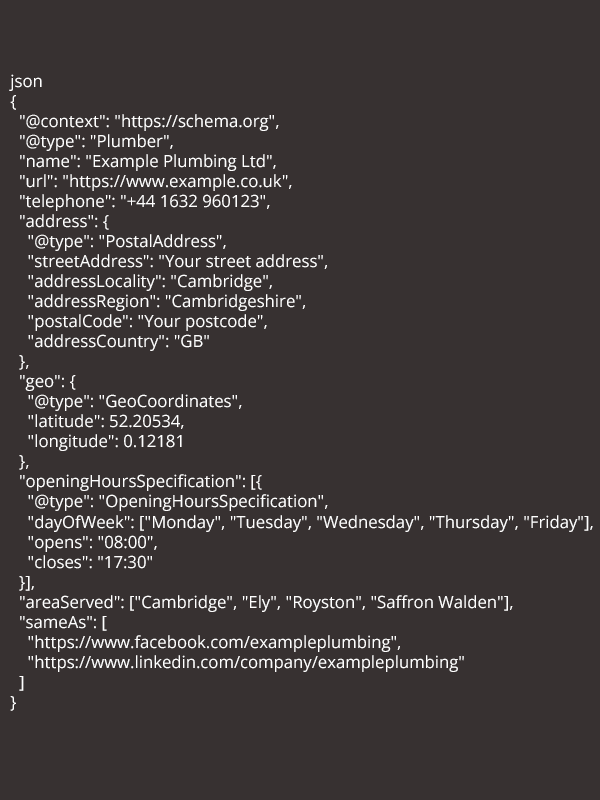
A plugin is a starting point, not the finish line. Check its output with the tools above. Plugins often default to the generic LocalBusiness type, leave out opening hours, or add review markup you don’t want.
A Schema Overview
- Use the most specific business type available
- Match your Google Business Profile exactly
- Add opening hours, map coordinates, the areas you serve and your official profiles
- Give each core service its own page and markup
- Keep FAQs for your visitors, not for dropdowns
- Don’t mark up your own testimonials for stars
- Test after every site change
Schema won’t rescue a thin website, and it won’t put you ahead of a competitor who is clearly better known locally. What it does is make sure that when Google, or anyone’s AI, reads your site, it comes away with the right answer about who you are.
If you’d like to know what your website is currently telling search engines, get in touch. We’ll tell you what’s missing, in plain English.